Volume Control Panel Pro

Description
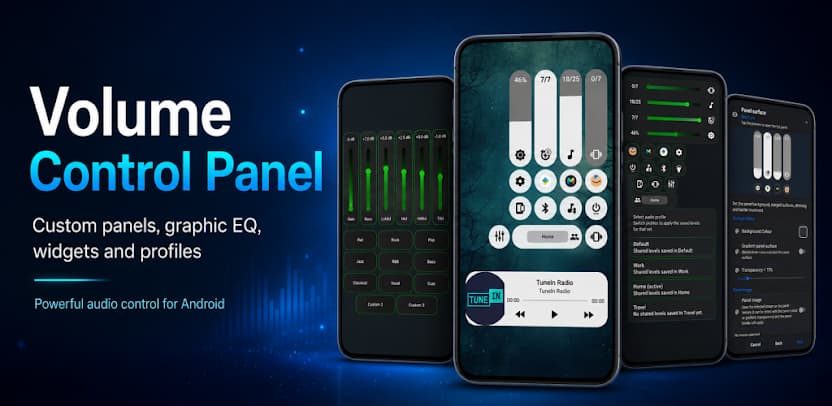
Android’s standard volume slider handles basic audio adjustments, but it often lacks flexibility, visual appeal, and precision control. If you want a tailored audio interface that matches your aesthetic and gives you granular control over every sound channel, Volume Control Panel Pro delivers the ideal solution.
This powerful Android app replaces your phone’s default volume overlay with a modern, fully customizable hub. Whether you want to fine-tune music playback, protect individual audio channels from accidental changes, or design an interface that complements your wallpaper, Volume Control Panel Pro upgrades your daily smartphone experience.
Design Your Perfect Interface with Theme Studio
Your smartphone reflects your personal style, and your volume interface should do the same. The built-in Theme Studio turns your audio overlay into a personal design canvas.
- Apply Custom Surfaces: Place your favorite photos, textures, or minimalist graphics directly onto the panel background.
- Refine Colors and Gradients: Craft custom color palettes, adjust background transparency, and set smooth corner radiuses.
- Tailor Sliders and Icons: Modify sliders, thumb handles, typography, and stream icons for maximum visual clarity.
- Adapt to Any Orientation: Set up distinct layouts for portrait and landscape modes to keep controls convenient while watching videos or gaming.
- Import and Export Creations: Save your design presets, share them with friends, or import community-crafted themes in seconds.
Whether you prefer an ultra-clean minimalist look or a dynamic, vibrant theme, Theme Studio gives you the exact tools to build it.
Shape Your Sound with the Graphic Equalizer
Great volume control goes hand-in-hand with great sound quality. Volume Control Panel Pro integrates a Graphic Equalizer that lets you shape your audio output across multiple frequency bands.
- Tune Your Music: Boost the bass, elevate mid-range vocals, or brighten high-end frequencies for your favorite tracks.
- Enhance Videos and Games: Balance game sound effects and movie dialogue for clear, immersive playback.
- Utilize Experimental Media Boost: Push audio output further on supported hardware and compatible audio apps when you need extra volume clarity in noisy environments.
Automate Listening Environments with Smart Audio Profiles
Different environments demand different sound setups. Instead of manually adjusting multiple sliders throughout the day, activate targeted Audio Profiles with a single tap.
- Contextual Presets: Switch instantly between custom setups for Work, Home, Commute, Gaming, Night, or Movie watching.
- App-Specific Automation: Configure optional app profiles that trigger your preferred sound profile automatically whenever you launch a specific game, streaming app, or navigation tool.
Protect Audio Levels with Stream Locking
Accidental button clicks in your pocket or sudden media spikes can disrupt quiet moments. The Stream Locking feature gives you full authority over your audio stability.
Lock individual streams—including Media, Ring, Notification, Alarm, and Call volume—to prevent unintended adjustments from physical buttons or third-party apps. Keep essential alerts loud and clear while preventing background media from unexpectedly blasting through your speakers.
Access Volume Controls Instantly Without Hardware Buttons
Worn-out physical buttons or large screens can make reaching volume keys difficult. Volume Control Panel Pro provides diverse, screen-based navigation shortcuts to keep your controls within easy reach:
- Home Screen Widgets: Place responsive volume widgets on your home screen for one-touch adjustments.
- Quick Settings Tiles: Open your full panel directly from Android’s pull-down notification shade.
- Floating Trigger: Keep an unobtrusive on-screen trigger button anchored anywhere along your display edge.
- Launcher Shortcuts: Launch specific audio menus directly from your application grid or dock.
Manage Media, Cast, and Brightness from One Central Hub
Volume Control Panel Pro extends far beyond standard sound sliders by integrating everyday device controls into a unified panel:
- Cast Volume Control: Adjust Google Cast and connected smart speaker streams without digging into individual apps.
- Media Playback Controls: Play, pause, skip tracks, and scrub through active media sessions directly from the volume interface.
- Screen Brightness: Adjust display illumination on the fly alongside your volume levels.
- Sound Mode Toggle: Switch seamlessly between Normal Ring, Vibrate, Silent, and Do Not Disturb (DND) modes.
Privacy First: Transparent Accessibility Service Usage
Volume Control Panel Pro values your privacy and uses Android’s AccessibilityService API strictly to deliver optional, core user-facing features.
- Purpose-Driven Access: The app utilizes accessibility permissions solely to detect hardware volume key presses, render the custom overlay, enable the Floating Trigger, and detect active apps for automated profiles.
- Strict Data Privacy: The app never captures keystrokes, reads on-screen text, records audio, accesses personal messages, or transmits private data to external servers.
- Complete User Control: Accessibility permissions remain entirely optional, and you can enable or revoke them at any time within your Android system settings.
Images


What's New
V35.XX - 6th October
* New micro slider when collapsed
* Bug Fixes
* Widget improvement's.
* Audio recording service.
* New design pre-set's.
* Custom Shortcuts - launch apps, shortcuts, activities + actions.
* New animations.
* Bubble trigger with resume notification.
* Theme wizard & studio with live preview.
* Per App & Audio Profiles.
* Graphic Equalizer & Audio Boost service.
* Long press lock volume streams.