Translate On Screen
EZ Screen Translator
42.04 MB
1.188
Android 7.0+
1,000,000+

Images


Description
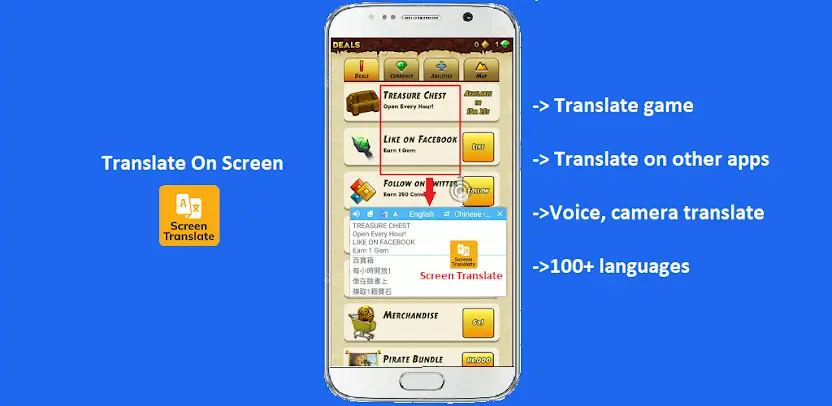
Translate On Screen is a smart screen-translation app that translates text directly on your display. It works especially well for social networks, games, foreign-language stories, comics, documents, and shopping apps that do not support your native language. You can quickly translate chat messages, posts, comments, game dialogue, manga, shopping listings, and foreign documents without switching back and forth between apps.
Translate Text in Any Application
Translate On Screen works on top of other apps. It reads the text visible on your phone screen and converts it instantly. You stay inside the app you are already using, saving time and avoiding constant interruptions.
Support for More Than 100 Languages
The app supports more than 100 languages. Whether you need to translate a conversation, social-media post, shopping page, game screen, or document, broad language coverage helps remove everyday language barriers.
Translate Chats, Posts, Games, and Comics
You can translate chat messages, comments, social-network posts, mobile games, comics, manga, and foreign-language stories. This makes it easier to follow conversations, understand jokes and cultural references, and enjoy entertainment originally written in another language.
Translate Shopping Apps and Documents
Foreign shopping apps become easier to navigate when product names, descriptions, prices, reviews, and checkout screens appear in your language. You can also translate documents, articles, and other text-heavy materials without copying them into another translator.
Use Image, Voice, and Camera Translation
Translate On Screen supports image, voice, and camera translation. You can photograph signs, menus, packaging, documents, or other printed text and convert it into readable language. Voice translation helps you understand spoken content, while image translation handles text you cannot easily select.
Detect Copied Text and Copy Translations
The app detects text you copy and translates it automatically. You can then copy the translated result and paste it into messages, notes, emails, documents, or other apps. This workflow makes translation practical for studying, working, shopping, and communicating.
Keep Translation Ready With a Floating Bubble
A floating bubble keeps translation available while you move between apps. Tap it whenever foreign text appears, translate what you need, and continue what you were doing. The bubble makes Translate On Screen feel like a permanent language assistant.
Scan and Recognize Text With OCR
Built-in OCR text recognition scans text directly from your screen or images. It identifies letters and words accurately, then translates them without requiring manual typing. This proves especially useful for screenshots, scanned documents, comics, games, and graphics containing text.
What's New
• Added Manga Mode.
• Added more customization options, including floating icon edge docking and background-free text in Auto Region Mode.
• Watch ads in advance to earn ad-free translations for the floating translator.