ScanCrypt
CryptonStudio Apps
33.32 MB
1.2.1
Varies with device
1,000,000+

Description
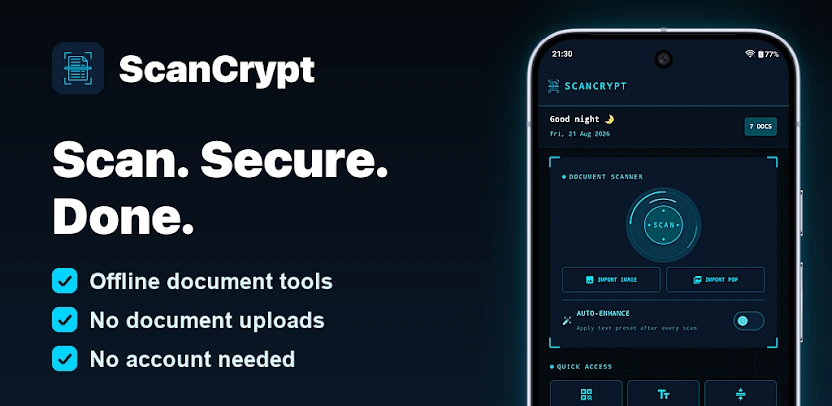
ScanCrypt is a powerful offline document scanner and PDF editor for Android. You scan paper documents to PDF in seconds, extract text with OCR, edit pages, sign forms, protect sensitive files, and organize your entire library. Your documents stay on your device. There is no document cloud and no account, while scanning, OCR, editing, and every other document tool works completely offline.
Scan Documents and Convert Anything to PDF
ScanCrypt turns your phone camera into a fast document scanner. Automatic edge detection finds the page, while deskewing, sharpening, and cleanup tools produce crisp results. You can batch-scan multi-page documents in one session, import photos or existing PDFs from your gallery, and save any webpage as a document. Dedicated capture modes handle ID cards, ID photos, and business cards with ease.
Edit, Annotate, and Sign PDFs
You edit PDFs directly by adding text, shapes, and highlights. You draw signatures freehand or reuse saved signature presets, doodle on any page, and apply watermarks, stamps, page numbers, headers, footers, and Bates numbering. Crop, rotate, resize, and reorder pages instantly. You can also find and replace text, blur sensitive areas, flatten forms, fill and create interactive PDF forms, and edit or strip metadata, annotations, and backgrounds.
Extract Text With OCR and Convert Files
The built-in OCR scanner extracts text from any scanned document. You convert PDFs to Word, Excel, PowerPoint, HTML, or plain text, export pages as high-quality JPG images, and pull embedded images out of PDFs. A Read Aloud feature reads any document back to you, which helps with proofreading and accessibility.
Protect and Secure Sensitive Documents
You password-protect PDFs with AES encryption and unlock files you own when you need them. Permanent redaction removes confidential information for good. A biometric vault keeps files fingerprint-locked and encrypted on your device, while individual folders can carry their own PIN. Document verification confirms that a file has not changed since you scanned it.
Organize, Compress, Merge, and Repair PDFs
Smart folders with tags and automatic file naming keep your library tidy. You compress PDFs without losing quality, merge multiple files, split by page range, file size, or bookmarks, remove unwanted pages, and add bookmarks. Advanced layouts include N-up pages, alternate mixing, and split-in-half views. Batch export, library backup and restore, and damaged-PDF repair round out the toolkit.
Share, Print, and Export on Your Terms
You compress a document and send it to WhatsApp in one tap, print directly from the app, or export files to your own WebDAV server. Your server means your control, and nothing leaves your phone unless you share or export it yourself.
Templates and Everyday Tools
ScanCrypt generates blank, lined, grid, and dot-grid PDFs for notes and planning. A built-in QR and barcode scanner reads EAN, UPC, and Code128 formats, while the QR generator creates new codes. Collage layouts combine images, and a home-screen widget starts a scan with a single tap.
Private by Design and Honest About the Rest
Scanning, OCR, and every PDF and image tool run entirely on your phone. ScanCrypt has no document cloud and no account, and it never uploads what you scan. Switch on airplane mode and the document tools work exactly the same. That is the test.
For transparency, the app discloses what it does send: ads on the free tier through Google AdMob, including the advertising ID; crash reports and anonymous usage analytics through Firebase, which you can switch off in Settings; and feature flags and pricing through Firebase Remote Config. That is the complete list. No document content leaves your device at all.
Why Choose ScanCrypt
ScanCrypt packs more than 70 tools into one scanner app. Document tools work fully offline, so you can scan, run OCR, and edit with no connection. There is no account and no sign-up, and the app runs on both phones and tablets. It supports 15 languages, uses a clean and modern interface, and stays lightweight with no bloatware.
Perfect for Study, Work, and Everyday Paperwork
Students, professionals, and anyone handling notes, contracts, receipts, invoices, IDs, bills, and certificates can scan, organize, and protect everything in one place.
Images