
CalcNote Pro
burton999 calculator developer
23.80 MB
2.25.112
5.0
5,000+

Images

Description
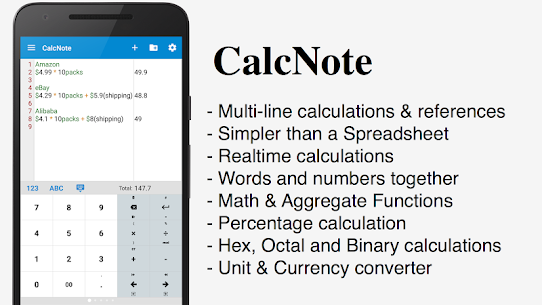
Forget tapping equals on a cramped keypad. CalcNote works like a notepad where you type expressions on each line, and answers appear instantly in real time. You can see multiple questions and answers at once, just like a spreadsheet but far simpler. Made a mistake? Fix the expression and CalcNote recalculates on the spot. This app turns your phone into a smart calculation sheet that keeps up with your thoughts.
CalcNote’s Real-Time Evaluation Works While You Type
Type any mathematical expression into CalcNote and watch the result appear without pressing equals. The notepad-style interface lets you write operations on each line and see instant answers. You can even mix text lines with calculations, so your notes stay readable and your math stays live. Every line gets evaluated automatically, making CalcNote feel like a word processor that solves math as you go.
Reference Lines in CalcNote for Spreadsheet-Style Multi-Line Calculations
CalcNote goes beyond a basic calculator by letting you reference previous lines, just like a spreadsheet. Write different operations on each line, then combine them using line references for multi-step calculations. You can also declare variables inline, so your formulas stay clean and reusable. This makes CalcNote perfect for budgeting, engineering, or any task that needs chained math without opening a spreadsheet.
Swipe Between CalcNote Keypads for Trig, Logs, and More
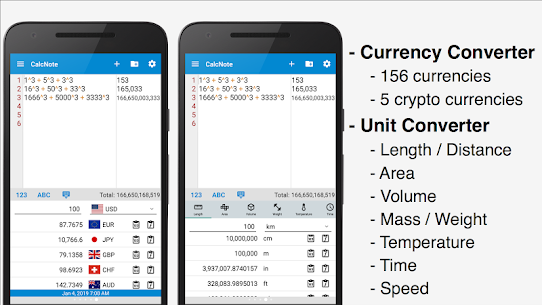
Swipe right or left to switch between multiple keypads inside CalcNote. You get regular math operations, logarithmic and trigonometric functions like sin and cos, permutations and combinations, plus a percentage calculator and a full unit converter. That means you can handle everything from simple addition to complex scientific notation without leaving the app.
Organize, Save, and Export Your CalcNote Sheets
CalcNote helps you stay organized by letting you sort calculation sheets into folders, save them individually, and export expressions for use elsewhere. Send your formulas to a spreadsheet or paste them into a scientific paper. You never lose a calculation, and you can reuse your work whenever you need it.
Customize CalcNote’s Look and Feel to Match Your Style
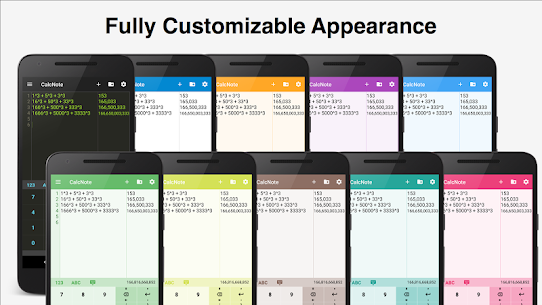
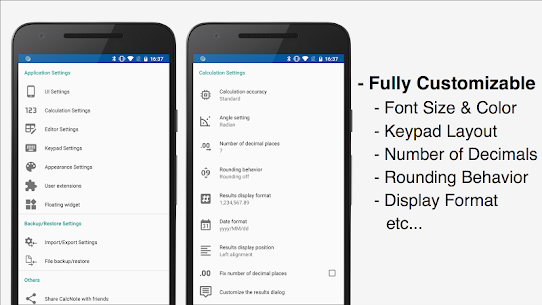
Make CalcNote yours by changing the background and text colors, showing or hiding line numbers, picking different fonts, and adjusting the display format. You can even customize the keypad layout to put your most-used operations right where you want them. CalcNote adapts to how you work, not the other way around.
CalcNote’s Detailed Feature Set Covers Everything From Hex Math to Currency Conversion
- Regular mathematical operations
- Multi-line calculations with mixed text and numbers
- Line references and inline variable declarations
- Percentage and modulo operations
- Hexadecimal, octal, and binary operations
- Square root, cube root, power, and factorial
- Permutations and combinations
- Trigonometric functions
- Aggregate functions
- Logarithm, natural logarithm, and natural exponential function
- Customizable display format (European and Indian styles)
- Customizable appearance and keypad layout
- Unit conversion for area, length, weight, speed, temperature, time, and volume
- Currency conversion with support for 31 currencies
- Saving and exporting expressions
What's New
### v2.24.90
1.Made some small improvements and fixed a few bugs.
### v2.24.89
1.Added support for in-file search and replace.
2.Added automatic screen rotation and customizable keypad in landscape mode for a better tablet experience.
3.Made some small improvements and fixed a few bugs.