Wordpad Plus
Griffin Developer Labs
35.93 MB
4.0.3
Android 8.0+
1,000,000+

Description
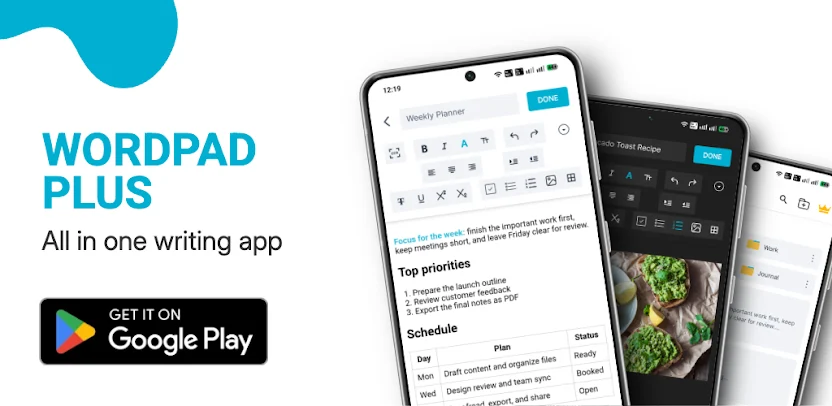
Write anywhere. Own every word. Wordpad Plus gives you a complete word processor for Android that works entirely offline. There is no account, no cloud, no subscription, and no monthly fee. You open the app and start writing immediately, with every tool available whether you are connected or not.
A Real Rich Text Editor
Most writing apps bury the formatting tools you actually need. Wordpad Plus gives you more than 20 formatting options in a toolbar that stays out of your way. You apply bold, italic, underline, strikethrough, superscript, and subscript, then adjust font size, text color, highlighting, alignment, and indentation. Bullet lists and numbered lists organize your thoughts, and you drop in images and build proper tables. Your resume, report, essay, or novel looks finished rather than like plain notepad text.
Listen to Any Document
Tap play and Wordpad Plus reads your document aloud in a natural voice, highlighting each line as it goes so you can follow along. You adjust the reading speed to suit your preference. Proofread while you walk around, or turn a long report into something you listen to during your commute.
Edit on Your Computer
You open your documents in any browser on the same Wi-Fi network and type on a full-size keyboard. Nothing gets uploaded, and nothing leaves your network. Your phone simply serves the page. You draft on mobile during the day and finish on a laptop at night without syncing to any cloud service.
Turn Print Into Editable Text
Point your camera at a printed or handwritten page, and the built-in OCR scanner converts it into text you can edit. Lecture notes, receipts, contracts, and book pages become editable documents in seconds. You digitize paper records without a scanner or a desktop.
Paste a Link and Get a Document
Drop in any article link and Wordpad Plus imports it as a clean, fully editable document. Wikipedia entries, blog posts, and news articles arrive without ads or clutter, ready for you to edit and annotate. Reference material becomes usable content with a single paste.
PDF and DOCX Support in Both Directions
You export any document to PDF in one tap. You also import existing PDF and DOCX files to read and edit them. Signing documents happens right on your phone. No printer, no desktop, and no third-party app is required for everyday document work.
Organized, Searchable, and Recoverable
Folders and subfolders keep long projects tidy. Full-text search finds any document instantly. A recycle bin catches accidental deletes, and full backup and restore means a new phone never has to mean starting from scratch.
Private by Design
Lock sensitive documents behind a PIN. You keep a journal that records the date and your mood, and it never leaves your device. No account is required, and nothing syncs anywhere, so no server holds your writing and no company reads it.
A Notepad and Checklist App Too
Quick notes, reading lists, packing lists, and to-dos all live in the same app. You tap an item to tick it off, swipe to delete it, and finished items tuck themselves away. Dark mode keeps late-night writing comfortable on your eyes.
Who It Is For
Students use Wordpad Plus to write essays and digitize lecture notes. Professionals draft reports, proposals, and resumes. Writers work on scripts, articles, and long-form drafts. Anyone who wants a straightforward offline text editor and document editor without a monthly subscription finds exactly what they need.
Images


What's New
Save article: long pages now save and open reliably, in any language.