Teleprompter with Video Audio

Images


Description
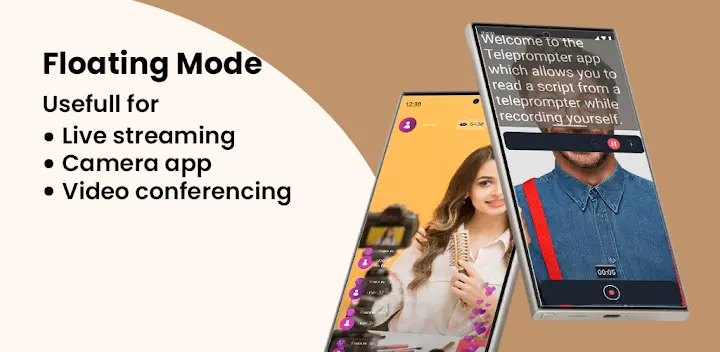
Read your script with a teleprompter app and record a video straight from your phone’s camera. This mobile teleprompter lets you read a pre-prepared script while recording yourself with the front or back-facing camera. You simply press record and read as the script scrolls down the screen. Because the text scrolls right next to the camera lens, you look like you’re talking directly to your audience — even though you’re reading every word.
Record With Confidence and Save Time
This teleprompter app reduces the time it takes to record video and makes your presentation more confident and attractive. You stop fumbling for lines, stop memorizing endlessly, and start delivering smooth, natural performances. Your videos come out polished, and you finish recording in a fraction of the time.
Use Front and Rear Cameras in Any Orientation
You record with the front or rear-facing camera, whichever fits the shot. Record in landscape or portrait to match your platform, and capture HD video at a high frame rate based on what your device supports. Whatever your setup, the app adapts to it.
Import Scripts From Common File Formats
You import scripts from TXT, DOCX, DOC, and PDF files. No retyping, no copy-pasting line by line. Load your document, adjust a few settings, and you’re ready to record. It’s a small feature that saves enormous time.
Adjust Text Size and Scroll Speed Easily
You change the text size and adjust the scrolling speed with simple controls. Find the pace that matches your natural speaking rhythm, then focus on your delivery. These quick tweaks keep your reading smooth and your eye contact consistent.
Record Audio and Frame Yourself Perfectly
You record audio using built-in and external microphones for better sound quality. A 3×3 or 4×4 grid helps you position yourself correctly in the frame, so your composition looks intentional. Add your brand logo to your recording device and display your quality title and custom logo in your content.
Customize and Publish Without Watermarks
You save your recordings without any watermark. Add your brand to your stories with the teleprompter video and audio features, and present your content with your own logo and title. Your videos stay branded, polished, and ready to publish.
Set Up With a Countdown and Bluetooth Controls
You set a countdown in settings so you have time to get into position before recording begins. You can also control the teleprompter with a Bluetooth or wired OTG keyboard. Using a keyboard lets you manage the scrolling script: press the Space key to play or pause, the Up key to increase scrolling speed, and the Down key to decrease it. Mirror the script for use in a professional teleprompter rig device, and adjust font size, scrolling speed, and other options in settings.
What's New
Latest Android OS supported.