Stash (Spotify + YouTube Music client)

Description
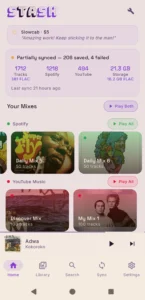
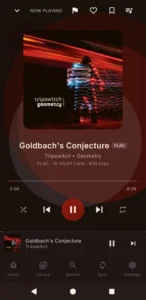
Stash is an offline-first Android music player that syncs your liked songs, playlists, daily mixes, and discover mixes from both Spotify and YouTube Music into a single unified local library.
Your Spotify + YouTube Music library, on your phone, in FLAC.
Stash mirrors your Spotify and YouTube Music libraries to your Android phone. You connect each service, pick the playlists and mixes you want, and Stash either downloads them as real FLAC files for offline playback or surfaces them as a streaming index so you can stream tracks without filling up your storage. Same library, two modes, one tap to switch.
Features
● Offline everything — tracks download as high-quality lossless audio
● Bulletproof matching — finds the right version of tracks 99% of the time
● Custom playlists — create your own playlists and save tracks to them from anywhere.
● Spotify & YT sync preferences — choose exactly which playlists, liked songs, daily mixes, and discovery mixes to sync. Individual toggles for each. Don’t want Daily Mix 3? Turn it off.
● Expanded Spotify mix detection — Release Radar, Discover Weekly, On Repeat, Daylist, Repeat Rewind, Time Capsule, and Daily Mixes 1-6 are all automatically detected when available. Each gets its own toggle.
● Refresh vs Accumulate sync modes — mixes can either replace their contents each sync (Refresh) or stack new tracks on top of what’s already there (Accumulate). Your call.
● Parallel downloads — 8 simultaneous tracks. Background sync runs as a foreground service so it actually finishes with the phone locked.
● High-res album art
● Automatic update notifications — checks GitHub for new releases daily and notifies you when one is available.
● Full equalizer — 5-band EQ with presets, bass boost, and virtualizer
● Spotify sign-in built in — just log into Spotify inside the app
● Private by design — credentials encrypted with AES-256-GCM, no servers, no telemetry, nothing leaves your phone
● Free and open source — no subscriptions, no ads, GPL-3.0
There’s no Stash account. No subscription. No ads. No analytics. Your credentials live on your phone, encrypted, and the only network traffic Stash makes is to Spotify and YouTube themselves.
Images
What's New
🎯 What's new
- A Download button on playlists and mixes (#474). It sits under Play All and Shuffle on your own playlists, your Spotify and YouTube playlists and mixes, and mixes you follow. It shows Downloading 5 of 7 while songs come in, then - Downloaded. New songs added to the playlist later download too. Tap it again to stop. The songs you already have stay on your phone.
- Choose where Stash opens (#428). Start on Home, Library or Search: Settings → Appearance → Open Stash on.
- Auto-sync works every day. Before, it could run once and then stop, and Sync now did nothing while Auto-sync was on. Both are fixed.
✨ Smaller improvements
Your settings always win (#521). Songs from Stash's own mixes, like Daily Discover, now follow your Lossless and Lossy fallback switches like every other song. No more surprise FLAC files when you picked a smaller size.
- JioSaavn works, and follows your quality (#484). When a song has no lossless match, Stash tries JioSaavn before YouTube, which helps with Indian and Bollywood music most. Until now it almost never delivered a song. Now it does, at the size your Download quality asks for. Streams follow Save Data.
- Search shows the right artist, and no longer shows "0:00" for every song. Matching songs on YouTube is also faster and finds more when you aren't signed in to YouTube Music.
- Last.fm and ListenBrainz count the time you actually listened. Time spent paused no longer counts toward a scrobble.
Sharing diagnostics tells us more, so we can fix your problem faster: which source played each song, playback errors, and what's waiting to run in the background. Find it in Settings → About & Help → Share diagnostics. The log no longer fills up with noise on Samsung phones.