NoteDraft

Description
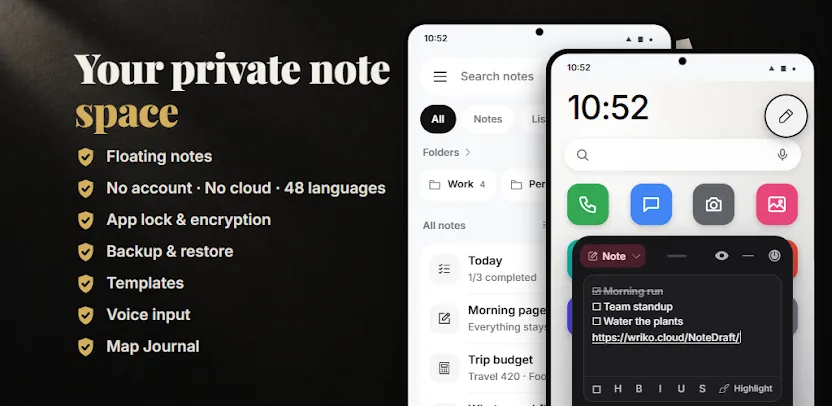
NoteDraft is a private notepad for Android where you write notes, build checklists, and lock sensitive content behind its own password. Everything stays on your phone, and the app works fully offline. There is no account, no sign-up, and no subscription.
Notes With Their Own Lock
You protect private notes, checklists, and workflows with their own password secured by AES-256 encryption. You can also protect the entire app with a PIN or your fingerprint. A password vault stores logins under a master password, with a strength meter and a built-in password generator. Many people use NoteDraft as a private diary or journal that stays locked, and notes and attachments stay out of Android’s automatic cloud backup so your writing never leaves the device.
Sticky Notes Over Any App
You open a floating note on top of whatever you are using and jot down ideas while watching, reading, or browsing. Twelve floating modes cover notes, checklists, workflows, calculation notes, links, snippets, names, schedules, shopping lists, counters, habit grids, and a today view. You also collect copied links while browsing and save them directly into your notebook.
Rich Text and Markdown
You format notes with headings, bold, italic, highlights, quotes, checklists, bulleted lists, and numbered lists. Tables support row and column totals, and code blocks include syntax highlighting. Wiki links let you connect notes with [[double brackets]] and show backlinks under each note. A reading mode removes the editor from the screen so you can read without distraction.
13 Ready-Made Templates
You start from templates including a Kanban board, habit grid, counters, shopping list, schedule, links, names, snippets, tabbed notebook, passwords, 2D canvas board, and flow graph. Calculator notes contain lines that calculate as you type, with totals that update instantly. A code editor offers syntax highlighting for 24 languages and opens text and code files directly.
Map Journal With GPS
You save places using GPS and find them again later with a compass arrow and a radar view. This turns NoteDraft into a travel and location journal as well as a notebook.
Capture Anything
You dictate notes with voice typing, which is set to offline by default and runs on the device where supported. You attach photos, camera shots, PDFs, audio from your recorder app, and other files. Reminders on individual notes help you follow up when a task matters.
Export and Backup Options
You export notes as PDF, HTML, Markdown, or TXT, or print them directly. Backups save everything into one password-encrypted file that you control and store yourself.
9 Home-Screen Widgets
Widgets include a notes list, a single note, a checklist, quick actions, a today view, templates, workflows, code, and places. Each gives you useful information and actions without opening the app.
48 Languages
You choose your language inside the app, independent of your phone’s system setting. The interface supports 48 languages.
NoteDraft gives you a notepad, checklists, sticky notes over other apps, and home-screen widgets, all working offline on your phone. There are no ads, no account, and no subscription.
Images