Gamedeck MOD APK (Pro Unlocked)

Images


Description
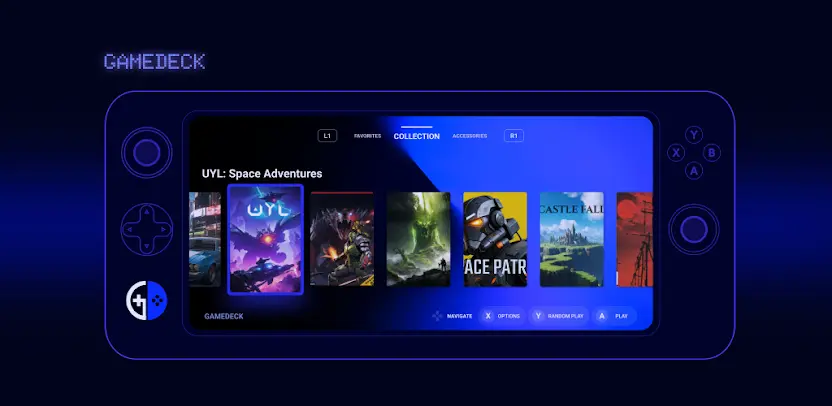
Gamedeck is a premium indie application designed to transform your standard smartphone into a high-end portable gaming machine. It acts as a sophisticated digital frontend that meticulously organizes your mobile games, emulators, and software into a unified, console-style interface. Beyond just a launcher, Gamedeck bridges the gap between mobile convenience and the immersive feel of a dedicated handheld console, providing a centralized hub for all your gaming activities.
Organize Your Library with a Console Aesthetic
The standout feature of Gamedeck is its ability to sweep away the clutter of a standard app drawer. It gathers your entire collection—including native Android titles and various emulators—into a handheld gaming console layout. This stylish presentation ensures that your library looks professional and stays organized, giving you that “pick up and play” feeling every time you unlock your device.
Seamless Gamepad Integration
For players who prefer tactile controls over touchscreens, Gamedeck offers full gamepad support. Whether you are using a Bluetooth controller or a USB-wired peripheral, the entire interface is fully navigable via your hardware. This eliminates the need to touch the screen between games, maintaining the seamless flow of a traditional gaming console environment.
Instant Access to Your Favorites
Don’t waste time scrolling through hundreds of apps to find what you’re currently playing. The Favorite Games section allows you to pin your top titles to a dedicated, easy-to-access area. This feature ensures that your most-played adventures are always at the forefront, ready to launch in a single click.
Limitless Visual Customization
Gamedeck empowers you to take full creative control over your interface. You can customize the appearance of nearly every element, from switching out game cover art to adjusting layouts and docks. Users can fine-tune wallpapers, fonts, and color schemes to match their personal style, ensuring no two setups look exactly alike.
Predefined and Custom Themes
If you want a fresh look without the manual effort, you can dive into the Themes library. Choose from a variety of expertly crafted predefined themes to instantly change the vibe of your dashboard. For the more creative users, the app provides the tools to build and save your own unique themes from scratch.
Advanced Diagnostic Tools and Shortcuts
Performance matters, and Gamedeck includes a suite of built-in tools to keep your rig running smoothly. Use the gamepad tester to calibrate your controllers or the overlay system analyzer to monitor performance in real-time. Additionally, the app features quick-access shortcuts for Bluetooth management, display settings, and essential system utilities, keeping you in the zone without leaving the app.
What's New
📢 v1.16.1: Updated features and fixed some issues.
[🟢=New Feature, 🟠=Feature Update, 🟣=Fix]
Here are some improvements from the last version of Gamedeck:
🟠 Update: The transparent blur effect of the Evo Dock has been re-enabled.
🟠 Update: Updated the transparent blur effect performance in the Accessories window.
🟣 Fix: Fixed the button text color issue where button text was previously occluded in some theme color settings.
[...]
I hope you enjoy Gamedeck. Keep gaming.