Event Flow Calendar Widget APK (Premium Unlocked)

Mod Info:
- Premium / Paid features unlocked;
- Disabled / Removed unwanted Permissions + Receivers + Providers + Services;
- Optimized and zipaligned graphics and cleaned resources for fast load;
- Ads Permissions / Services / Providers removed from AndroidManifest;
- Ads links removed and invokes methods nullified;
- Ads layouts visibility disabled;
- Google Play Store install package check disabled;
- Debug code removed;
- Remove default .source tags name of the corresponding java files;
- Analytics / Crashlytics / Firebase disabled;
- Languages: Full Multi Languages;
- CPUs: universal architecture;
- Screen DPIs: 160dpi, 240dpi, 320dpi, 480dpi, 640dpi;
- Original package signature changed;
- Release by Balatan.
Description
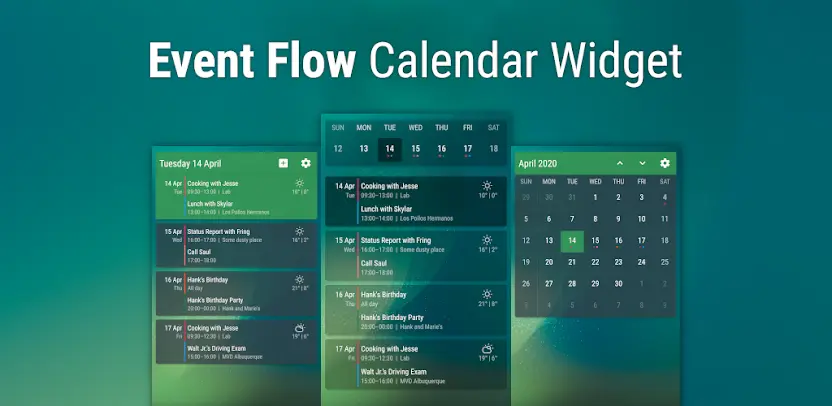
Looking for a simple yet powerful way to manage your schedule directly from your home screen? Event Flow Calendar Widget is a clean and beautiful calendar widget that brings your agenda and events into focus with style and customization. With the Premium Unlocked version, you get access to all the advanced features without limitations.
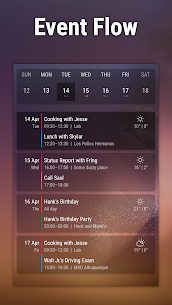
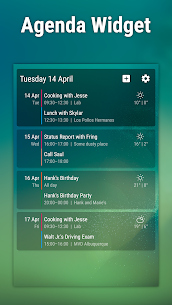
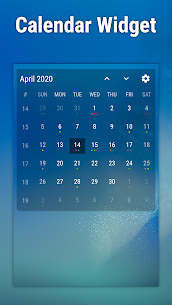
Event Flow offers two main widgets: an agenda view that neatly groups your events by day, and a resizable month view calendar. Both widgets are designed to blend seamlessly with your home screen, while giving you quick access to upcoming events.
Key Features
- Agenda widget showing your events grouped by day
- Calendar widget with resizable month view
- Wide customization options: background, fonts, colors, header, and more
- Ready-to-use preset themes for faster setup
- Option to choose which calendars are displayed
- Weather forecast for up to 5 days (premium only)
- Smooth and lightweight performance
This widget is free to download, but many customization features are locked in the free version. With the Premium Unlocked edition, you’ll enjoy full access to advanced customization and weather integration without restrictions.
FAQ and Tips
How to use the widget
Since Event Flow is a widget, you can place it directly on your home screen. Simply long press on an empty area, select “Widgets,” and drag Event Flow to your home screen.
The widget is not updating
If updates don’t show up, it’s often caused by your device’s battery optimization settings. Make sure Event Flow is allowed to update in the background. More info can be found at dontkillmyapp.com.
Why aren’t reminders available?
Google has not enabled reminders for third-party apps yet. The developers are monitoring for future changes.
My Outlook/Exchange calendar isn’t showing
Enable “Sync calendars” in the Outlook app settings. Alternatively, add your Outlook/Exchange account in Android’s system settings under Accounts to sync it through Google Calendar.
Birthdays or other calendars not syncing
The widget reads the local Android calendar database. If some events don’t appear, refresh the sync under Settings > Accounts > [Your Account] > Account Sync and ensure “Calendar” and “Contacts” are refreshed.
Recreating the screenshot look
Most examples use both widgets together: place the Calendar Widget at the top (one row high) and the Agenda Widget below it without a header, then customize colors to your liking.
Selecting exact colors
The color picker lets you enter a Hex code, including alpha values for transparency. You can copy/paste codes between options for consistent styling.
Images


What's New
Fix issues on Android 16+