Desktop Style Launcher

Images


Description
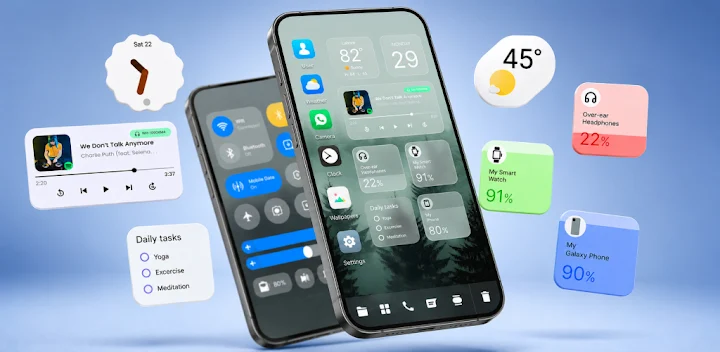 Modern Desktop Launcher turns your Android phone or tablet into a desktop-style workspace. It helps you arrange apps, files, folders, and widgets in one place. You get a familiar layout, quick navigation, and deep customization without losing mobile convenience. If you want a home screen that works as hard as you do, this launcher gives you the tools to make it happen.
A Desktop-Inspired Home Screen Built for Android
Modern Desktop Launcher places icons, folders, and widgets on a clean desktop-style canvas. You can drag, drop, group, and resize items to match how you think. The layout feels like a computer desktop, but it stays touch-friendly and responsive. You organize your Android device around your workflow instead of fighting a cluttered home screen.
Start Menu Puts Your Favorite Apps Within Reach
Open the Start Menu to launch apps fast. Search by name, browse categories, and pin the tools you use most. You spend less time swiping through pages and more time getting things done. The menu keeps your most important apps close without filling your home screen with unnecessary icons.
Built-In File Manager Keeps Your Files Organized
Browse, copy, move, rename, delete, and arrange files without opening a separate app. The launcher’s file manager gives you direct access to documents, downloads, images, and folders. You can clean up clutter and find what you need from one interface. This feature helps you treat your Android device more like a personal computer.
Themes, Wallpapers, and Icons Let You Customize Everything
Change the look of your home screen with themes, wallpapers, icon packs, fonts, and colors. Adjust icon size, grid layout, animations, and desktop appearance. Modern Desktop Launcher adapts to your style instead of forcing you into one design. You can create a minimal setup, a bold workspace, or anything in between.
Widgets Turn Your Home Screen Into a Dashboard
Add clocks, weather updates, calendars, notes, music controls, and other widgets. Arrange them where they make sense. Your Android device becomes a personal dashboard that shows the information you care about at a glance. Widgets help you check updates, manage tasks, and control media without opening multiple apps.
Folders Keep Apps Tidy and Easy to Find
Group related apps into folders. Create categories like work, games, social, finance, or tools. A tidy home screen helps you move faster and reduces visual noise. When every app has a place, you spend less time searching and more time using your device.
Quick Search Finds Apps, Contacts, and Files Instantly
Use one search bar to find installed apps, contacts, and files. Start typing, and the launcher shows relevant results. Quick Search saves taps and helps you stay focused. You do not need to remember where you saved something because the launcher brings it to you.
Productivity Tools Speed Up Your Daily Flow
Access recent apps, frequently used tools, and shortcuts from your workspace. Set up the launcher around your routine. Whether you manage tasks, study, create content, or run a business, fast navigation keeps you moving. Modern Desktop Launcher supports productivity without adding confusion.
Smooth Performance Keeps Everything Responsive
Modern Desktop Launcher focuses on optimized animations and efficient memory usage. It aims to deliver a responsive experience on Android devices. You get a polished workspace without unnecessary slowdown. Smooth performance matters when you launch apps, switch tasks, or search for files throughout the day.
Personalization Options Give You Full Control
Customize icon size, grid layout, desktop appearance, wallpapers, animations, fonts, colors, and more. You can build a simple setup or a feature-rich command center. The choice stays in your hands. Modern Desktop Launcher gives you enough control to make your home screen feel truly personal.
Privacy Stays on Your Device
Modern Desktop Launcher keeps your personal information on your device. It only requests permissions when a feature needs them. You stay in control of your data and your workspace. The launcher respects your privacy while still delivering the tools you expect.
Why Choose Modern Desktop Launcher?
- Clean desktop-inspired interface
- Fast and responsive performance
- Deep customization options
- Simple file organization
- Powerful search functionality
- Flexible widget support
- Regular feature updates
- User-friendly design
- Productivity-focused tools
- Privacy-conscious approach
What's New
- Fixed an issue where the home screen could stop responding to swipes and long presses Bug fixes and stability improvements.