BuzzKill Notification Manager MOD APK

Mod Info:
● Pairip Protection Removed / Disabled.
● Play Services, Transport, Firebase Properties Removed.
● All Unnecessary Garbage Folder & File Removed.
● Duplicate Dpi Item Remove Like:
– Bar Length, Drawable Size, Gap Between Bars.
● Splits0 File Removed (Resources & AndroidManifest).
● Splits0 Releated Unnecessary Meta-Data Remove Like:
– Stamp Source, Stamp Type Standalone Apk, Android Vending Splits, Android Vending Derived Apk.
● Removed Debug Information (Source, Line, Param, Prologue, Local).
Description

BuzzKill is a powerful and customizable notification manager designed to give you complete control over how and when you receive alerts on your Android device. Whether you’re tired of constant buzzing from unnecessary messages or looking for a way to streamline your digital life, BuzzKill makes managing notifications easy, effective, and highly personalized.
Take Back Control of Your Messaging Apps
Stop Repetitive and Spammy Notifications
If you use apps like WhatsApp, Messenger, Twitter, or similar platforms, you’re probably no stranger to receiving repetitive or promotional messages—especially from unknown contacts. BuzzKill tackles this by automatically filtering out identical messages or repeated alerts from the same sender. This smart system ensures that your phone only notifies you once, eliminating the headache of hearing the same alert multiple times in a row. You decide what’s worth your attention, and BuzzKill ensures your peace and quiet isn’t disrupted by needless repetition.
Filter Notifications Based on Your Schedule
Customize Notification Timing and Priority
BuzzKill lets you dictate when notifications are allowed and when they’re not. You can set specific time windows where alerts are silenced—perfect for work hours, meetings, or sleep. Want to mute game alerts during your 9 to 5? Done. Need to receive critical updates after hours? BuzzKill handles that too.
It even supports persistent notifications that remain until you acknowledge them, helping you avoid missing crucial events. Whether you’re in focus mode or winding down, this tool helps you manage your time and attention like a pro.
Personalized Alerts for Important Contacts
Identify Who’s Messaging Without Picking Up Your Phone
Another standout feature of BuzzKill is its ability to assign unique sounds and vibrations for specific contacts or keywords. This means you can immediately recognize when someone important is trying to reach you—no need to even look at your screen.
You can also tailor vibration patterns for quiet environments like meetings, where a discreet buzz can let you know who’s texting without disturbing others. These personalized settings make communication more intuitive and less disruptive.
Feature Highlights: BuzzKill’s Superpowers
Here are some of the unique tools and features that make BuzzKill more than just a notification blocker:
-
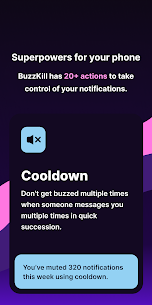
Cooldown – Prevents back-to-back alerts when someone sends multiple messages in a short period.
-
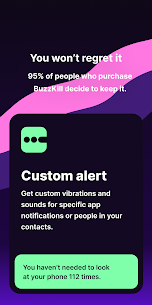
Custom Alert – Lets you assign distinct sounds or vibration patterns to contacts or specific words.
-
Dismiss – Automatically swipes away notifications you don’t want to see—without disabling the app entirely.
-
Reply – Sends an automatic message if you haven’t opened a notification after a set time.
-
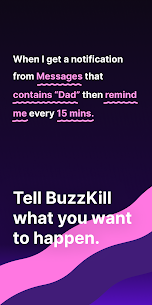
Remind Me – Keeps nagging you with alerts until you open the notification.
-
Undo – Accidentally cleared a notification? This gives you a second chance to retrieve it.
-
Snooze – Collects and delivers notifications in batches, so they appear when it’s most convenient for you.
-
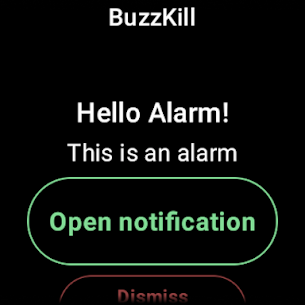
Alarm – Triggers a loud alert for high-priority messages, like security alerts or safety updates.
-
Secret – Hides the content of sensitive notifications from your lock screen or status bar.
These features empower you to create a notification experience that works for you, not against you.
Commitment to Privacy and Data Security
No Ads. No Trackers. No Internet Access.
BuzzKill sets itself apart from most apps on the Play Store by putting privacy first. It does not access the internet, meaning no personal data ever leaves your device. There are no ads, no tracking systems, and no analytics harvesting your behavior. This approach ensures that your private information stays exactly where it belongs—on your phone.
No Free Trial, But Full Refund Support
Because BuzzKill does not connect to the internet, it can’t verify purchases in real-time and thus cannot offer a traditional free trial. However, if you’re unsatisfied, you can contact the developer directly through the app for a full refund—even after Google Play’s standard return window.
BuzzKill for Wear OS: Notifications on Your Wrist
If you use a Wear OS smartwatch, you’ll love BuzzKill’s companion app. It mirrors your notification rules onto your watch, ensuring you’re alerted wherever you are. You can trigger alarms or notification actions directly on your watch, adding convenience and flexibility to your wearable experience.
Advanced Automation with Accessibility Service
BuzzKill includes an optional Accessibility Service API to perform advanced actions like auto-tapping buttons in notifications. It’s completely local—no data is shared—and is only needed for specific automation rules. This gives power users a new layer of automation without compromising privacy.
What About Phone Calls?
Currently, BuzzKill has limited support for incoming phone calls. You can’t set a custom vibration or ringtone for calls, but you can use the Unsilence Rule to override Do Not Disturb settings based on caller identity, time of day, or location. While phone calls are handled differently at the system level, BuzzKill still offers some flexibility here.
Discover Even More Features
The list of features doesn’t stop there. With tools like auto-dismiss, auto-reply, smart reminders, and secure notification handling, BuzzKill is a comprehensive solution for anyone looking to reclaim control over their device’s notifications.
What's new
Show notification message in alarm notification
Resume reminders when DND ends
Bug fixes
Images