
3C Battery Manager Pro

Images
Description
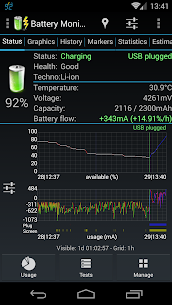
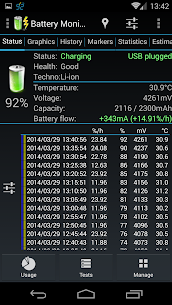
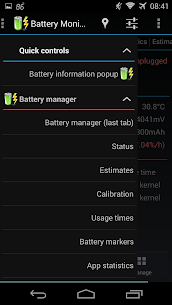
3C Battery Manager stands out as the Swiss Army knife for anyone who wants granular control over their device’s power. Instead of guessing how much juice you have left, this app lays out the full picture: percentage, milliampere-hours, milliwatts, voltage, and even temperature history. You can see how your battery ages over time, calculate exactly how long you’ll stay unplugged, and even trigger custom alarms if something drops below a safe threshold. The interface is smooth, the graphics are fully scrollable and zoomable, and everything feels built for power users who love digging into the nitty-gritty details of their Android’s energy flow.
Track Every Detail of Your Battery’s Health
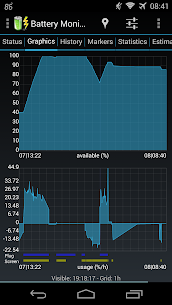
Historical data is where 3C Battery Manager really shines. Plot graphs of capacity drain, voltage fluctuations, and temperature spikes across days or weeks. The app calculates estimated run-times whether you’re unplugged or charging via AC, USB, or wireless. It even helps calibrate your battery by letting you manually reset statistics on rooted phones, ensuring your readings stay accurate as the hardware ages. With support for multiple batteries, you can monitor every cell in a dual‑setup device without missing a beat.
Widgets That Make Monitoring a Breeze
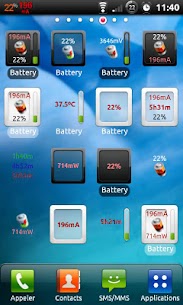
- Display historical graphics or real‑time battery data on your home screen using widgets of various sizes.
- Choose from wide (2×1) or graphic layouts (2×1, 3×1, 4×1) to match your home screen style.
- Fully scrollable and zoomable charts mean you never lose sight of the numbers that matter most.
- Add history markers manually or automatically on boot, ROM, kernel, or battery changes for a complete log.
Pro Features Unlocked, No Ads
This version brings the pro experience without the price tag. All premium features are unlocked, ads are removed entirely, and the app is AOSP compatible with debug code stripped out. The original package signature has been changed for seamless installation, and you get full multi‑language support plus coverage of every major CPU architecture—arm64-v8a, armeabi-v7a, x86, x86_64—and screen DPIs ranging from 120dpi up to 640dpi. No matter your device, 3C Battery Manager fits perfectly.
Export, Calibration, and Multi‑Battery Mastery
- Export data to System Tuner Pro to analyze which processes are responsible for battery drain.
- Keep information for an unlimited number of batteries (two in the free version, all of them in the pro version).
- Manually reset battery statistics on rooted phones for precise calibration.
- Update battery capacity or reference values based on measured data for long‑term accuracy.
Built for Every Device
Whether you’re a casual user who just wants to see how long until your phone dies, or a hardcore enthusiast tweaking every watt, 3C Battery Manager adapts to your needs. The online help is accessible right from the app, so you’re never left in the dark. Before committing, try the free version and check out the full 3C Toolbox experience at the official site—this modified build gives you the complete, ad‑free pro suite ready to install and start using immediately.
What's New
Add mA support for Elite A63 Max
Add watcher last trigger information (upcoming triggers only)
Add option to enable mA readings when 65W charger is supported (configuration wizard)