ReadEra Premium APK (Paid)

Description
We invite you to discover ReadEra Premium, a unique and powerful tool designed to streamline how you search, read, and manage your library. You act as the curator of your own unique collection of books and documents. Whether you need to study complex documents or enjoy a casual novel, we provide the ultimate interface to handle it all. Plus, you can try it risk-free with our 30-day money-back guarantee!
Master Every Document Format
You no longer need multiple apps to open different file types. You access a versatile platform that supports a massive range of formats, allowing you to read books and manage documents seamlessly. We support:
-
Book Formats: EPUB, Kindle (MOBI, AZW3), FB2.
-
Document Formats: PDF, DjVu, Microsoft Word (DOC, DOCX, RTF), ODT, TXT, and CHM.
-
Comic Formats: CBZ, CBR.
Unlock Exclusive Premium Power
You elevate your reading journey by upgrading to Premium. We offer advanced features that integrate your reading life across devices and enhance your study habits:
-
Seamless Synchronization: You synchronize your books, documents, reading progress, bookmarks, and quotes with Google Drive. You switch between devices effortlessly without losing your place.
-
Advanced Text-to-Speech (TTS): You listen to your books and documents in the background, even when your screen is locked. You turn any document into an audiobook.
-
Centralized Knowledge: You view all your intellectual data in one place. We collect all your quotes, notes, bookmarks, and reviews into a specific “Quotes & Notes” section.
-
Integrated Dictionary: You expand your vocabulary by accessing a dedicated section that stores all the words you looked up across all your documents.
-
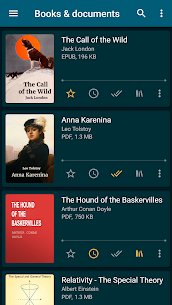
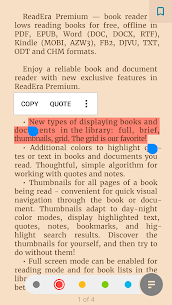
Visual Customization: You upload your own custom fonts, use specific colors to highlight quotes, and customize the library view (grid, list, or thumbnails) to suit your aesthetic.
Curate Your Digital Library automatically
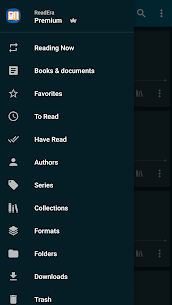
You save time with our intelligent auto-detection system. The app automatically locates all supported books and documents on your device. You organize your content by sorting files by author, series, and format. You create personal collections to group related materials, and you use the intuitive search function to find specific titles or authors instantly. We even help you save storage space by identifying and managing duplicate files.
Take Control of Your Files
We give you the tools to manage your device’s file system directly from the app.
-
Folder Management: You navigate through external folders, view the number of files inside, and perform administrative tasks like creating, copying, moving, and deleting folders.
-
File Manipulation: You view detailed information about file locations, rename documents, edit metadata (Author, Series, Title), and share files with ease.
Customize Your Reading Environment
You control every visual aspect of the page to ensure maximum comfort. You choose from multiple color themes—Day, Night, Sepia, or Console—to reduce eye strain. You adjust the screen orientation, brightness, page margins, and line spacing. You can even modify the font size, boldness, and type. For PDF and DjVu files, we support smooth zooming to help you read fine print clearly.
Read Easily and Efficiently
You enjoy a professional-grade reading experience that adapts to your needs. Download ReadEra Premium today to organize your documents, sync your library, and enjoy your books like never before!
What's new
• Improved full-screen reading mode for Android 15 and above.
• Optimized cover extraction, display of quotes, footnotes, and table of contents in some rare books for an even more comfortable reading experience.
• Enhanced Japanese text support: line breaks when displaying ruby (furigana), alignment of inline images; display of enlarged characters and some dialogues.
• Improved display of Chinese text in TXT files.
• Improved TTS (text-to-speech) performance.
Images