O Launcher Premium

Description
O Launcher is an enhanced launcher for Android™ O 8.0 Oreo™ launcher, modern & cool launcher.
If you want to try Android O 8.0 Oreo launcher without upgrade;
If you phone can not upgrade to Android O 8.0 Oreo;
If you want your phone to look modern one like brand new;
If your phone’s launcher is old, ill-looking, slow and less features;
Then this O Launcher is for you! Just download and try, you will like it!
★ O Launcher features:
– Android O 8.0 Oreo launcher looking and experience, available for Android 4.4+ devices
– Themes & icon pack: Support 5000+ launcher themes and almost all third-party launcher icon pack
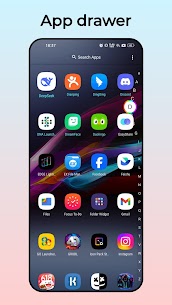
– Android O 8.0 Oreo launcher style drawer: vertical drawer with favorite apps section
– Icon themes: Build-in round icon theme, square icon theme, teardrop icon theme
– Wallpapers: Many online beautiful wallpapers for O Launcher
– Gestures support, 9 gestures
– Hide App support, swipe up with two fingers to show hidden apps
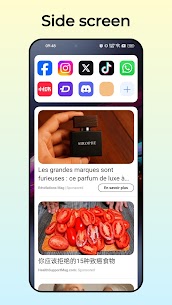
– Side Screen, it has many features: torch, cleaner, battery saver, storage manager and favorite apps
– Notifier/Counter for unread SMS, missed Call and other apps, just from icons on launcher screens
– Edit app icon and app name individually
– Icon dot support, you can long press icons on launcher desktop
– Drawer color setting
– Lock desktop icon and layout
– Launcher grid size option
– Easy launcher screens edit mode
– Launcher app icon size, icon label, color option
– 10+ launcher search bar style option
– Dock background customization
What's new
v12.9
1.Added multiple colorful themes
Images