Appwatch – Pop Up Ads Removal MOD APK (Pro)

Description

Do annoying pop-up advertisements constantly interrupt your mobile device usage, appearing randomly across your screen without warning? Does the frustrating mystery of identifying which application causes these intrusive pop-up ads leave you feeling helpless and annoyed? AppWatch delivers the perfect solution to this widespread problem that plagues millions of smartphone users daily. This powerful anti pop-up ads application helps you identify exactly which app generates those irritating advertisements that disrupt your mobile experience. AppWatch monitors your device activity intelligently, tracking which applications launch in the background and creating a detailed history of app behavior. Users finally gain the investigative tools needed to catch culprit applications red-handed, exposing the sources of unwanted advertising that compromise your device performance and waste your valuable time. Stop guessing which app betrays your trust by flooding your screen with advertisements. AppWatch empowers you to take control of your mobile environment, eliminating intrusive pop-ups permanently by identifying their sources accurately and efficiently.
Simple Four-Step Process to Identify Ad-Serving Apps
Step One: Activate Monitoring Protection
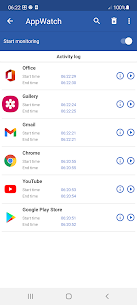
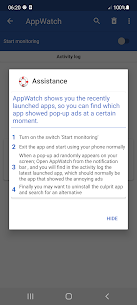
Launch the AppWatch application on your mobile device and locate the clearly labeled “Start monitoring” switch prominently displayed on the main interface. Activate this monitoring function by tapping the switch to the ON position. The application immediately begins tracking all app launches and background activity occurring on your device. This continuous monitoring operates silently without affecting your device performance or draining battery life excessively. The intelligent tracking system records every application that starts, runs, or operates in the background, creating a comprehensive activity timeline that proves invaluable for identifying pop-up ad sources.
Step Two: Resume Normal Device Usage
Exit the AppWatch application completely and return to using your smartphone or tablet exactly as you normally would throughout your daily routine. Browse your favorite websites, check social media platforms, play mobile games, stream videos, send messages, or engage in any typical mobile activities. The AppWatch monitoring system continues working silently in the background, diligently recording application activity without requiring any attention or interaction from you. This passive monitoring approach ensures accurate data collection that reflects your genuine usage patterns, making it easier to identify which applications misbehave during normal operation.
Step Three: Investigate When Pop-Ups Appear
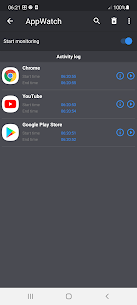
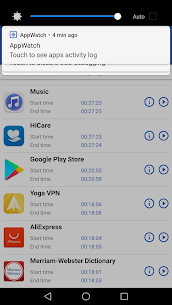
When an annoying pop-up advertisement suddenly appears randomly on your screen, interrupting your activities with unwanted commercial content, immediately open the AppWatch application. Navigate to the activity history section where AppWatch displays a chronological list of recently launched applications. Examine the latest launched app entries carefully—the most recently activated application typically represents the culprit responsible for displaying those frustrating pop-up advertisements. AppWatch’s detailed activity timeline shows exact launch times, making it simple to correlate pop-up appearances with specific app activity. This investigative approach provides concrete evidence identifying which application violates your trust by serving intrusive advertisements.
Step Four: Remove the Offending Application
After successfully identifying the application responsible for generating annoying pop-up ads, you can take decisive action to eliminate the problem permanently. Consider uninstalling the culprit application immediately to stop the intrusive advertisements from appearing on your device. Navigate to your device settings, locate the offending app in your applications list, and remove it completely from your system. Subsequently, search your device’s app store for alternative applications that provide similar functionality without compromising your user experience with invasive advertising. Read user reviews carefully, checking specifically for comments about excessive advertisements or pop-up behavior before installing replacement apps. This methodical approach helps you build a cleaner app collection featuring quality applications that respect your time and attention.
Understanding AppWatch’s Anti Pop-Up Technology
Comprehensive App Activity Monitoring
AppWatch functions as a sophisticated anti pop-up ads detective tool that helps users discover precisely which applications cause disruptive pop-up advertisements on their devices. The application employs advanced monitoring technology that tracks app launches, background processes, and system activities comprehensively. Unlike basic task managers that only show currently running apps, AppWatch maintains detailed historical records of application behavior over time. This historical perspective proves essential for identifying apps that occasionally display pop-ups rather than constantly showing advertisements. The monitoring system captures data efficiently without requiring excessive system resources, ensuring your device maintains optimal performance while AppWatch operates. Users gain unprecedented visibility into application behavior, exposing hidden advertising practices that many apps employ to generate revenue at the expense of user experience.
Reclaim Your Mobile Device from Intrusive Advertising
Enjoy Ad-Free Mobile Experience
AppWatch empowers smartphone and tablet users to reclaim control over their mobile environments by eliminating intrusive pop-up advertisements permanently. The application provides transparency into app behavior that developers often hide, revealing which applications respect users and which prioritize aggressive monetization over user satisfaction. By identifying and removing apps that display pop-up ads, you create a cleaner, faster, more enjoyable mobile experience. Your device performance improves as you eliminate applications that consume resources displaying unwanted advertisements. Battery life extends when you remove apps constantly running background processes to serve pop-ups. Data usage decreases significantly when intrusive ads stop downloading advertising content without your permission.
Make Informed App Choices
Beyond simply identifying current pop-up sources, AppWatch helps you develop better app selection habits for the future. Users learn to recognize warning signs of apps likely to display intrusive advertisements, becoming more selective about which applications earn installation privileges on their devices. This educational benefit creates long-term value, helping you maintain a pop-up-free device environment permanently. You develop awareness about which app categories typically employ aggressive advertising strategies, which developers respect user experience, and which alternatives provide similar functionality without invasive monetization. AppWatch transforms frustrated users into informed consumers who make deliberate choices about their mobile software, prioritizing quality applications that enhance rather than detract from their smartphone experience.
What's new
v2.0.13:
* Fixed bugs.
Images